会话
Hermes Agent 会自动将每次对话保存为一个会话。会话支持对话恢复、跨会话搜索以及完整的对话历史管理。
会话如何工作
每次对话——无论来自 CLI、Telegram、Discord、Slack、WhatsApp、Signal、Matrix、Teams 还是其他消息平台——都会作为包含完整消息历史的会话被存储。会话的追踪信息保存在:
- SQLite 数据库(
~/.hermes/state.db)——存储结构化的会话元数据,支持 FTS5 全文搜索,以及完整的消息历史
SQLite 数据库存储的内容包括:
- 会话 ID、来源平台、用户 ID
- 会话标题(唯一的、人类可读的名称)
- 模型名称和配置
- 系统提示快照
- 完整的消息历史(角色、内容、工具调用、工具结果)
- Token 计数(输入/输出)
- 时间戳(开始时间、结束时间)
- 父会话 ID(用于压缩触发的会话拆分)
上下文计数的范围
Hermes 会保存会话历史以便恢复对话,但不会在每次交互时都重复发送所有曾处理过的数据。在每一轮对话中,模型只看到选定的系统提示、当前对话窗口以及 Hermes 为该轮显式注入的内容。
媒体附件作为轮次范围内的输入处理:
- 图片可以直接附加到下一次模型调用中,或者当当前模型不支持原生视觉能力时,预分析为文本描述。
- 音频在配置了语音转文字后会转写为文本。
- 文本文档可以包含提取的文本;其他类型的文档通常以保存的本地路径和简短备注表示。
- 附件路径和提取/派生出的文本可能会出现在对话记录中,但原始图片、音频或二进制文件的字节不会在后续提示中重复复制。
例如,如果用户发送了一张图片并要求 Hermes 基于它生成一个梗图,Hermes 可能会用视觉能力检查一次该图片并运行图像处理脚本。后续的轮次不会自动将原始 JPEG 带入上下文,它们只携带写入对话的内容,例如用户的请求、一段简短的图片描述、本地缓存路径或最终的助手回复。
上下文增长最常见的原因不是媒体文件本身,而是冗长的文本:粘贴的对话记录、完整日志、大型工具输出、长 diff、重复的状态报告以及详细的调试转储。推荐使用摘要、文件路径、精简摘录和基于工具的动态查询,而不是将大量内容复制到聊天中。
当会话变长时使用 /compress,开启新线程时使用 /new,只有当你想要从存储中删除旧的已结束会话时才使用 hermes sessions prune。压缩会减少活动的上下文;它不是隐私删除。向 /new 传递一个名称(例如 /new payments-refactor)可以提前设置新会话的初始标题——这在之后通过 /resume <名称> 或 /sessions 选择器查找它时非常有用。
会话来源
每个会话都带有其来源平台的标签:
--- END DOCUMENT CHUNK ---
| 来源 | 描述 |
|---|---|
cli | 交互式命令行 (hermes 或 hermes chat) |
telegram | Telegram 即时通讯 |
discord | Discord 服务器/私信 |
slack | Slack 工作区 |
whatsapp | WhatsApp 即时通讯 |
signal | Signal 即时通讯 |
matrix | Matrix 房间和私信 |
mattermost | Mattermost 频道 |
email | 电子邮件 (IMAP/SMTP) |
sms | 短信 (通过 Twilio) |
dingtalk | 钉钉即时通讯 |
feishu | 飞书/Lark 即时通讯 |
wecom | 企业微信 |
weixin | 微信 (个人版) |
bluebubbles | 通过 BlueBubbles macOS 服务器的 Apple iMessage |
qqbot | QQ 机器人 (腾讯 QQ) 通过官方 API v2 |
homeassistant | Home Assistant 对话 |
webhook | 传入的 Webhook |
api-server | API 服务器请求 |
acp | ACP 编辑器集成 |
cron | 定时 Cron 任务 |
batch | 批量处理运行 |
CLI 会话恢复
使用 --continue 或 --resume 从 CLI 恢复之前的对话:
继续上次会话
# 恢复最近的 CLI 会话
hermes --continue
hermes -c

# 或者使用 chat 子命令
hermes chat --continue
hermes chat -c
这会从 SQLite 数据库中查找最近的 cli 会话,并加载其完整的对话历史。
按名称恢复
如果你给会话设置了标题(参见下面的会话命名),可以按名称恢复:
# 恢复一个已命名的会话
hermes -c "my project"

# 如果有多个版本(my project, my project #2, my project #3),
# 这会自动恢复最新的一个
hermes -c "my project"   # → 恢复 "my project #3"
恢复指定会话
# 按 ID 恢复指定会话
hermes --resume 20250305_091523_a1b2c3d4
hermes -r 20250305_091523_a1b2c3d4

# 按标题恢复
hermes --resume "refactoring auth"

# 或者使用 chat 子命令
hermes chat --resume 20250305_091523_a1b2c3d4
会话 ID 会在你退出 CLI 会话时显示,也可以通过 hermes sessions list 查找。
恢复时的对话回顾
当你恢复会话时,Hermes 会在输入提示前,在一个样式化的面板中显示之前对话的紧凑回顾:
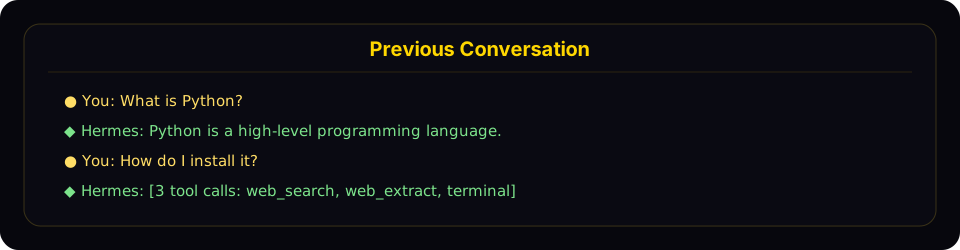
恢复模式会显示一个紧凑的回顾面板,包含最近的用户和助手对话轮次,然后返回实时提示。
回顾面板:
- 显示用户消息(金色
●)和助手回复(绿色◆) - 截断长消息(用户消息 300 字符,助手回复 200 字符 / 3 行)
- 折叠工具调用为带有工具名称的计数(例如
[3 个工具调用: terminal, web_search]) - 隐藏系统消息、工具结果和内部推理
- 限制在最近 10 轮对话,并显示 "... N 条更早的消息 ..." 的指示
- 使用暗淡样式以区别于活跃对话
要禁用回顾并保持极简的单行行为,请在
~/.hermes/config.yaml中设置:
display:
  resume_display: minimal   # 默认: full
会话 ID 的格式为 YYYYMMDD_HHMMSS_<hex> — CLI/TUI 会话使用 6 位十六进制后缀(例如 20250305_091523_a1b2c3),网关会话使用 8 位后缀(例如 20250305_091523_a1b2c3d4)。你可以通过 ID(完整或唯一前缀)或标题来恢复会话——-c 和 -r 均支持。
跨平台交接
在 CLI 会话中使用 /handoff <platform> 将实时对话转交到消息平台的首页频道。Agent 会从 CLI 断点处继续执行——相同的会话 ID、完整的角色感知转录、工具调用等。
# 在 CLI 会话内
/handoff telegram
具体流程:
-
CLI 验证
<platform>已启用并已设置首页频道(在目标聊天中运行一次/sethome即可配置)。 -
CLI 将会话标记为待定状态,并阻塞轮询网关。如果 Agent 正在生成回复则拒绝转交——请等待当前回复结束后再操作。
-
网关监视器接管交接,并要求目标适配器创建一个新线程:
- Telegram — 开启一个新的论坛话题(如果聊天中启用了 Bot API 9.4+ 话题模式则为私信话题,否则为论坛超级群话题)。
- Discord — 在首页文本频道下创建一个 1440 分钟自动归档的线程。
- Slack — 发送一条种子消息,并将其
ts作为线程锚点。 - WhatsApp / Signal / Matrix / SMS — 没有原生线程支持,直接回退到首页频道。
-
网关将目标键重新绑定到现有的 CLI 会话 ID,然后伪造一个用户轮次,要求 Agent 确认并总结。回复会落到新线程中。
-
网关确认成功后,CLI 打印一个
/resume提示并正常退出:↻ 交接完成。会话现已激活于 telegram。
稍后在此 CLI 上使用以下命令恢复:/resume my-session-title -
此后,对话在平台端继续进行。在新线程中回复——该频道内任何被授权的用户共享同一会话,并且之后该线程中任何真实的用户消息都会无缝加入,因为线程会话不依赖
user_id键。
恢复回 CLI: 当你想回到桌面端时,只需运行 /resume <title>(或在 shell 中运行 hermes -r "<title>"),即可从平台断点处继续。
失败模式:
- 未配置首页频道 → CLI 拒绝并提示
/sethome。 - 平台未启用 / 网关未运行 → CLI 在 60 秒后超时,显示明确消息,你的 CLI 会话保持原样。
- 线程创建失败(权限不足、未开启话题模式) → 直接回退到首页频道,交接仍可完成;没有线程隔离但交接本身正常。
adapter.send失败(限流、临时 API 错误) → 交接标记为失败并附带原因;记录会被清除,你可以重试。
值得注意的限制: 对于不支持线程的多用户群聊首页频道平台,伪造的用户轮次会以私信风格的会话键形式出现。这在自收私信的首页频道(典型设置)中可行,但对于真正的共享群聊并不理想。线程支持覆盖了 Telegram / Discord / Slack——这是最常见的场景——因此大多数设置不会遇到此问题。
会话命名
为会话赋予人类可读的标题,方便你快速查找和恢复会话。
自动生成标题
Hermes 会在第一次会话交互后自动为每个会话生成简短的描述性标题(3–7 个词)。此过程在后台线程中使用快速辅助模型运行,因此不会增加延迟。当你使用 hermes sessions list 或 hermes sessions browse 浏览会话时,会看到自动生成的标题。
自动标题功能每个会话只触发一次,如果你已经手动设置了标题,则会跳过。
手动设置标题
在任何聊天会话(CLI 或网关)中使用 /title 斜杠命令:
/title 我的研究项目
标题会立即生效。如果会话尚未在数据库中创建(例如,在发送第一条消息之前运行 /title),标题会排队等待,等会话启动后再应用。
你也可以从命令行重命名现有会话:
hermes sessions rename 20250305_091523_a1b2c3d4 "重构认证模块"
标题规则
- 唯一 — 两个会话不能共享相同的标题
- 最长 100 个字符 — 保持列表输出整洁
- 经过清理 — 控制字符、零宽字符和 RTL 覆盖符会被自动去除
- 普通 Unicode 没问题 — 表情符号、中文、带重音符号的字符都可以
压缩时的自动派生
当会话上下文被压缩时(手动通过 /compress 或自动触发),Hermes 会创建一个新的延续会话。如果原会话有标题,新会话会自动获得带编号的标题:
"我的项目" → "我的项目 #2" → "我的项目 #3"
当你按名称恢复会话时(hermes -c "我的项目"),它会自动选择派生链中最新的会话。
消息平台中的 /title
/title 命令在所有网关平台(Telegram、Discord、Slack、WhatsApp)中均可使用:
/title 我的研究— 设置会话标题/title— 显示当前标题
会话管理命令
Hermes 通过 hermes sessions 提供了一套完整的会话管理命令:
列出会话
# 列出最近的会话(默认:最近 20 个)
hermes sessions list

# 按平台过滤
hermes sessions list --source telegram

# 显示更多会话
hermes sessions list --limit 50
当会话有标题时,输出会显示标题、预览和相对时间戳:
标题                  预览                                     最后活跃   ID
────────────────────────────────────────────────────────────────────────────────────────────────
重构认证             帮我把认证模块重构一下                      2 小时前    20250305_091523_a
我的项目 #3         你能看看这些测试失败吗?                    昨天       20250304_143022_e
—                     拉斯维加斯的天气怎么样?                    3 天前    20250303_101500_f
当没有会话有标题时,会使用更简洁的格式:
预览                                          最后活跃   来源   ID
──────────────────────────────────────────────────────────────────────────────────────
帮我把认证模块重构一下                          2 小时前   cli    20250305_091523_a
拉斯维加斯的天气怎么样?                         3 天前   tele   20250303_101500_f
导出会话
# 将全部会话导出为 JSONL 文件
hermes sessions export backup.jsonl

# 从特定平台导出会话
hermes sessions export telegram-history.jsonl --source telegram

# 导出单个会话
hermes sessions export session.jsonl --session-id 20250305_091523_a1b2c3d4
导出的文件中每行包含一个 JSON 对象,带有完整的会话元数据和所有消息。
删除会话
# 删除特定会话(需确认)
hermes sessions delete 20250305_091523_a1b2c3d4

# 跳过确认直接删除
hermes sessions delete 20250305_091523_a1b2c3d4 --yes
重命名会话
# 设置或更改会话标题
hermes sessions rename 20250305_091523_a1b2c3d4 "debugging auth flow"

# 多单词标题在 CLI 中不需要引号
hermes sessions rename 20250305_091523_a1b2c3d4 debugging auth flow
如果该标题已被其他会话使用,则会显示错误。
清理旧会话
# 删除结束时间超过 90 天的会话(默认值)
hermes sessions prune

# 自定义保留天数阈值
hermes sessions prune --older-than 30

# 仅清理来自某个平台的会话
hermes sessions prune --source telegram --older-than 60

# 跳过确认
hermes sessions prune --older-than 30 --yes
清理只删除已结束的会话(即被明确结束或自动重置的会话)。活跃会话永远不会被清理。
会话统计
hermes sessions stats
输出:
Total sessions: 142
Total messages: 3847
  cli: 89 sessions
  telegram: 38 sessions
  discord: 15 sessions
Database size: 12.4 MB
如需更深入的分析——Token 用量、费用估算、工具分解和行为模式——请使用 hermes insights。
会话搜索工具
Agent 内置了一个 session_search 工具,它利用 SQLite 的 FTS5 引擎对所有历史对话进行全文搜索——并且允许 Agent 滚动浏览找到的任何会话。无需 LLM 调用,不做摘要,不做截断。每次查询都会从数据库返回真实的消息。
三种调用形态
该工具会根据你设置的参数推断你的意图。没有 mode 参数。
1. 发现——传入 query:
session_search(query="auth refactor", limit=3)
运行 FTS5,按会话血缘关系去重,返回最匹配的 N 个会话。每个结果包含:
session_id、title、when、sourcesnippet——FTS5 高亮的匹配片段bookend_start——会话的前 3 条用户+助手消息(目标/启动阶段)messages——FTS5 匹配点附近的 ±5 条消息,其中锚点消息会标记(即上下文中的命中结果)bookend_end——会话的最后 3 条用户+助手消息(决策/收尾阶段)match_message_id、messages_before、messages_after
上下界 + 滑动窗口一起重构了 目标 → 匹配 → 收尾 的过程,无需支付整个对话记录的费用。在真实的会话数据库上,典型耗时:15–50ms。
2. 滚动 — 传入 session_id + around_message_id:
session_search(session_id="20260510_174648_805cc2", around_message_id=590803, window=10)
返回以锚点为中心的 ±window 条消息窗口。不涉及 FTS5,也没有边界标记——仅仅是切片。在发现调用后,当你需要比默认 ±5 窗口更多的上下文时使用。
- 要向前滚动:将
messages[-1].id作为around_message_id传回 - 要向后滚动:将
messages[0].id作为around_message_id传回 - 边界消息会出现在两个窗口中,作为方向标记
- 当
messages_before或messages_after小于window时,说明你已到达会话的开头或结尾
典型耗时:每次滚动调用 1–2 毫秒。
3. 浏览 — 无参数:
session_search()
按时间顺序返回最近的会话(标题、预览、时间戳)。当用户问“我之前在做什么”但没有指定主题时很有用。
FTS5 查询语法
关键词模式支持标准的 FTS5 查询语法:
- 简单关键词:
docker deployment(FTS5 默认使用 AND) - 短语:
"exact phrase" - 布尔运算:
docker OR kubernetes,python NOT java - 前缀:
deploy*
可选参数
sort—newest或oldest,在 FTS5 排序之上生效。省略则仅按相关性排序(默认值;适合探索性回忆)。对于“我们上次在 X 上做了什么”这类问题使用newest,对于“X 是怎么开始的”这类问题使用oldest。role_filter— 要包含的角色列表,用逗号分隔。发现模式默认为user,assistant(工具输出通常是噪音)。传入user,assistant,tool以包含工具输出(调试工具行为),或传入tool仅搜索工具输出。
使用时机
Agent 会被提示自动使用会话搜索:
“当用户提到过去对话中的内容,或者你怀疑存在相关的先前上下文时,请在要求他们重复之前使用 session_search 来回忆。”
典型触发场景:“我们之前做过这个”、“还记得……的时候”、“上次”、“正如我提到的”,或者任何对当前窗口中没有的项目/人/概念的引用。
按平台会话追踪
网关会话
在消息平台上,会话由基于消息来源的确定性会话键来标识:
| 聊天类型 | 默认键格式 | 行为 |
|---|---|---|
| Telegram 私聊 | agent:main:telegram:dm:<chat_id> | 每个私聊一个会话 |
| Discord 私聊 | agent:main:discord:dm:<chat_id> | 每个私聊一个会话 |
| WhatsApp 私聊 | agent:main:whatsapp:dm:<canonical_identifier> | 每个私聊用户一个会话(当存在映射时,LID/电话号码别名会合并为一个身份) |
| 群聊 | agent:main:<platform>:group:<chat_id>:<user_id> | 当平台暴露用户 ID 时,群内按用户区分 |
| 群组线程/话题 | agent:main:<platform>:group:<chat_id>:<thread_id> | 所有线程参与者共享会话(默认)。设置 thread_sessions_per_user: true 时按用户区分。 |
| 频道 | agent:main:<platform>:channel:<chat_id>:<user_id> | 当平台暴露用户 ID 时,频道内按用户区分 |
| 当 Hermes 无法为共享聊天获取参与者标识符时,它会回退到该房间的一个共享会话。 |
共享式 vs 隔离式群组会话
默认情况下,Hermes 在 config.yaml 中使用 group_sessions_per_user: true。这意味着:
- Alice 和 Bob 可以在同一个 Discord 频道中与 Hermes 对话,而无需共享对话历史
- 某个用户执行的长耗时的工具密集任务不会污染另一个用户的上下文窗口
- 中断处理也保持按用户进行,因为正在运行的 Agent 键与隔离式会话键匹配
如果你想要一个共享的“房间大脑”,可以设置:
group_sessions_per_user: false
这样会将群组/频道恢复为每个房间的单一共享会话,既可以保持共享的对话上下文,也会共享 Token 费用、中断状态以及上下文增长。
会话重置策略
网关会话会根据可配置的策略自动重置:
- idle — 在 N 分钟不活动后重置
- daily — 每天特定小时重置
- both — 以先到者为准(空闲或每日)重置
- none — 永不自重置
在会话被自动重置之前,Agent 会获得一个轮次,用于保存对话中的重要记忆或技能。
存在活动后台进程的会话永远不会被自动重置,无论策略如何。
存储位置
| 内容 | 路径 | 描述 |
|---|---|---|
| SQLite 数据库 | ~/.hermes/state.db | 所有会话元数据 + 带有 FTS5 的消息 |
| 网关消息 | ~/.hermes/state.db | SQLite — 所有会话消息的权威存储 |
| 网关路由索引 | ~/.hermes/sessions/sessions.json | 将会话键映射到活动会话 ID(原始元数据、过期标志) |
SQLite 数据库使用 WAL 模式支持并发读取和单一写入者,适合网关的多平台架构。
数据库模式
state.db 中的关键表:
- sessions — 会话元数据(id, source, user_id, model, title, timestamps, token 计数)。标题有唯一索引(允许 NULL 标题,只有非 NULL 标题必须唯一)。
- messages — 完整的消息历史(role, content, tool_calls, tool_name, token_count)
- messages_fts — 用于跨消息内容进行全文搜索的 FTS5 虚拟表
会话过期与清理
自动清理
- 网关会话根据配置的重置策略自动重置
- 重置之前,Agent 会保存即将过期会话中的记忆和技能
- 可选自动修剪:当
sessions.auto_prune为true时,早于sessions.retention_days(默认 90 天)的已结束会话会在 CLI/网关启动时被修剪 - 在修剪实际删除了行之后,会对
state.db执行VACUUM以回收磁盘空间(SQLite 不会在普通 DELETE 后缩小文件) - 修剪每
sessions.min_interval_hours(默认 24 小时)最多运行一次;上次运行的时间戳记录在state.db内部,因此同一HERMES_HOME下的所有 Hermes 进程共享该信息 默认是关闭的——会话历史对session_search召回很有价值,静默删除可能会让用户感到意外。在~/.hermes/config.yaml中启用:
sessions:
  auto_prune: true          # 选择启用——默认为 false
  retention_days: 90        # 已结束的会话保留这么多天
  vacuum_after_prune: true  # 清理后回收磁盘空间
  min_interval_hours: 24    # 清理操作不要比这个频率更频繁
活跃的会话永远不会被自动清理,无论其存在时间长短。
手动清理
# 清理超过 90 天的会话
hermes sessions prune

# 删除特定会话
hermes sessions delete <session_id>

# 清理前导出(备份)
hermes sessions export backup.jsonl
hermes sessions prune --older-than 30 --yes
数据库增长缓慢(通常:数百个会话约 10-15 MB),并且会话历史为跨过往对话的 session_search 召回提供支持,因此自动清理默认是禁用的。如果你正在运行一个繁重的网关/cron 工作负载,其中 state.db 明显影响性能(已观察到的故障模式:约 1000 个会话的 384 MB state.db 导致 FTS5 插入和 /resume 列表变慢),可以启用它。使用 hermes sessions prune 进行一次性清理,无需开启自动清理。